

Centralised reports for faster group decisions
Compare bookings, revenue, clients and team performance by salon, region or across the group, using the same measures.
Salon groups & multiple locations
Salon Manager is multi-location salon management software that gives you group-wide visibility from one location. Connect AI-powered dashboards, centralised reporting, shared client records and a call centre, while each salon keeps the local control it needs.
Give individuals, salon managers, regional leaders and head office the right access. Build your group around one connected Enterprise setup.
A personal walkthrough • UK support • No obligation
Shared client records · Group gift vouchers · Access by role
Illustrative access structure. Configure it around your group.
Built around the working day
Salon Manager software gives leadership a clearer view. AI-powered dashboards show individuals and managers where to focus. Centralised reporting lets leadership compare salons, review a region or see the whole group from one location.
Our all-in-one software helps premium salons keep their service standards as they grow. Keep local services, prices and teams, with a growth-focused group view to direct support and find opportunities to grow revenue.
AI-powered dashboards
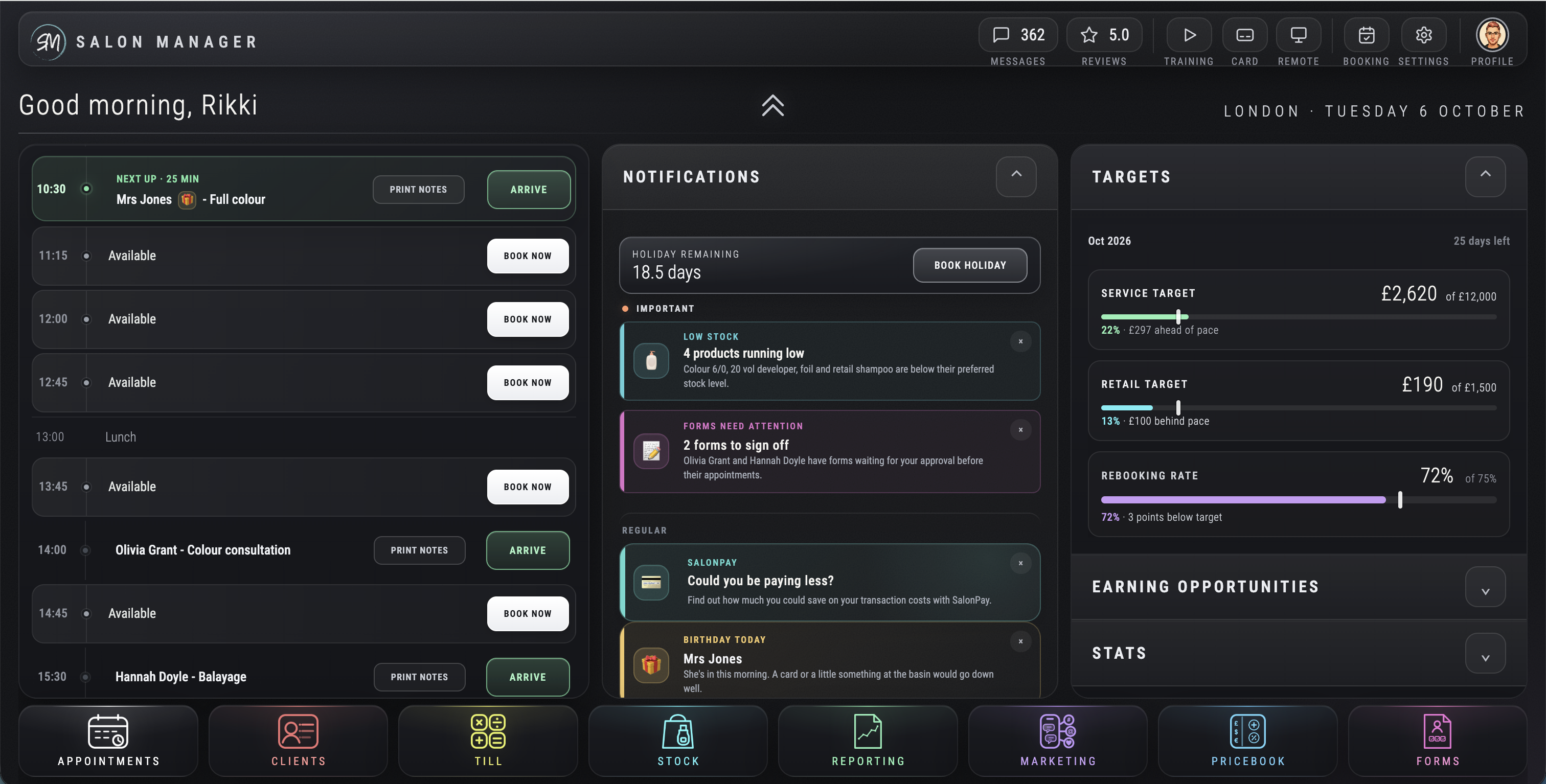
Give team members a clear view of their day and targets. Help managers focus coaching, with wider reporting for group leaders.
The tools your team will use
See how the group fits together. The workflow illustrations below explain the controls; the dashboard screenshot above shows the product view.
Compare bookings, revenue, clients and team performance by salon, region or across the group, using the same measures.
Authorised teams can open the same client record card at every location, with history and preferences ready for the visit.
Let a central team check availability and book the right salon, service and team member across your group.
Clients can book without a login or new account, then manage their appointment, including cancellation under your rules.
Let clients redeem a group gift voucher at any location, keeping their choice flexible and their spend with your brand.
Review products across locations and manage transfers, with local stock control and group oversight.
Run campaigns for selected salons or the whole group to encourage rebooking and grow repeat business.
Set services, prices, opening hours and teams by location within one connected group platform.
Review country, region and salon views. Regional managers focus on their locations; leadership sees the wider business.
Use the appropriate currency at each location. Agree currency and reporting requirements during setup.
Less friction. More ways to book.
Yes. Clients can book without logging in or creating an account. They can still manage the appointment and cancel in line with your rules.
Bookings connect to the diary and salon CRM, so your team keeps visibility across locations.
Explore online salon booking software and branded apps, or bring your booking journey to the demo.
BOOK
Book online without creating an account or logging in.
VISIT
Authorised teams can access the same client record card.
RETURN
Give clients the freedom to return to the salon that suits them.
From features to everyday work
| Area | Local control | Group control |
|---|---|---|
| Services and diary | Set local services, prices, staff and hours. | Coordinate bookings through central reception. |
| People and access | Give each person the access they need. | Define salon, regional and head-office permissions. |
| Client records | Review history and preferences for each visit. | Share one salon CRM record across locations. |
| Gift vouchers | Redeem at the client’s chosen salon. | Make group vouchers usable across your locations. |
| Stock | Receive, count and sell local stock. | Review global stock control and inter-salon transfers. |
| Performance | Use individual and salon dashboards. | Compare centralised reports across the group. |
Group permissions and workflows depend on the agreed configuration. Explore Enterprise pricing and confirm the locations, roles and shared records your business needs.
Make it work your way
Agree which users need individual, salon, regional and group views. Review services, pricing, reporting, call-centre responsibilities and local controls.
Review available data and configure shared client records, group gift vouchers, stock, reporting and booking rules. Confirm permissions before launch.
Test a central booking, a visit at another salon, voucher redemption and the dashboard views for each role. Train your teams and agree the rollout plan.
Choosing the best salon software for your group? Compare how each salon chain management software option handles the same workflow. Use our salon software comparison to test the same workflow. Explore the wider online salon management system and salon booking software within one salon software system.
Frequently asked questions
Clear answers about salon groups & multiple locations, before you choose your setup.
Have a workflow we have not covered? Talk it through in your demo.
Salon software UK
Compare sites using the same measures.
Keep client history connected across locations.
Review quantities and product transfers.
Built for the way you lead
Bring your locations, access structure and biggest operational challenge. We will demonstrate the group workflow, including your AI salon receptionist requirements, using your diaries and salon CRM.


